Version 1.10.0 lets you control one connection at a time, and it teaches an agent how to work with your site’s blocks. It came out on 2 November 2026. On a site you already run, nothing changes until you use it: every new control is off or behaves as before, and existing connections keep their access.
The catalog moves from 179 to 182 abilities: 88 in core and 94 from integrations. All three new abilities are block tools, and like every ability they stay off until you enable them.
Takeaways:
- Each OAuth connection can be paused and resumed without signing in again, given an end date and a lower rate limit, and shows when and from which address it was last used.
- Approving an app, and Quick Connect, offer an access preset: Read only, Content editor, Shop manager or Custom. A preset only narrows tools you already enabled.
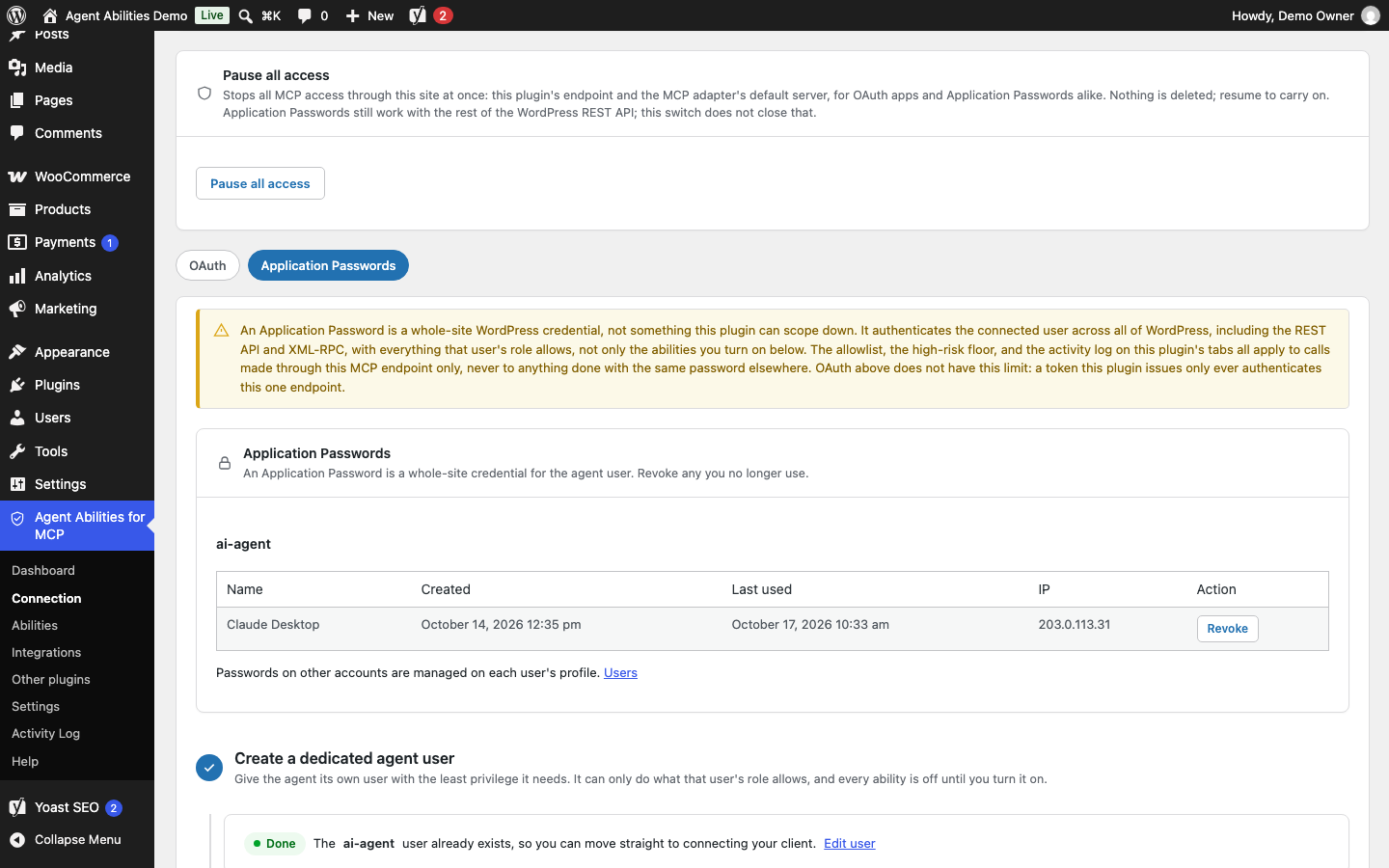
- The Connection tab now has OAuth and Application Passwords tabs and a Pause all access switch. The client registration switch moved there from Settings.
- Three new block tools let an agent list block types, read one block type (Advanced Custom Fields, or ACF, fields included) and replace a single block without resending the page.
- Block writes keep plain text such as an
&as written for users who may post unfiltered HTML, and they warn about things that used to be dropped silently.
Control each connection
Until now the main way to stop one app was Revoke, which signs the app out so the person has to approve it again. In 1.10.0 each approved OAuth connection, one person’s approval of one app, has its own row of controls on the Connection tab, under OAuth, in Active grants.
| Control | What it does |
|---|---|
| Pause and Resume | A paused connection keeps its sign-in and gets an ordinary 403 Forbidden until you resume it. Nobody approves it again. Since 1.10.1 it can still list tools, and each tool call says the connection is paused. |
| End date | After the date the connection is refused until a site administrator renews it, and its old tokens never work again. |
| Rate limit | A lower per-minute cap for this connection alone. Its calls count against both its own limit and the site-wide one. |
| Last used | When the connection last made a call, and from which address. |
Pausing one connection does not stop the same person’s Application Password. To stop everything at once there is a separate Pause all access switch at the top of the same tab.
The full walkthrough, including what an agent sees when it is paused, is in pause, limit or expire an AI agent connection on WordPress.
Access presets
The consent screen an app shows when it asks to connect, and Quick Connect, now offer four presets: Read only, Content editor, Shop manager and Custom. You can change a connection’s preset later on its row.
A preset means “up to these tools”. It only narrows what the Abilities tab, the role allowlist and the connection allowlist already allow, and it never reaches a tool you did not enable. Custom adds no limit.
Someone who approves an app but cannot manage the site can pick the site default or a narrower preset, never a wider one.
A rebuilt Connection tab, and what moved
The top of the Connection tab is the same: the endpoint and Check my connection. Below it, a Pause all access card comes first, then two tabs.
- OAuth holds a collapsed “Token lifetimes and client registration” card, Registered clients and Active grants.
- Application Passwords lists the agent users’ passwords with their last use and a Revoke button.
The dynamic client registration switch left the Settings tab for the token lifetimes card. It is the setting that lets an app such as ChatGPT or Claude register itself with your site without you copying a client ID between screens. Settings gained two things in return.
- Roles that can connect decides who may approve an app. A site that was already installed keeps the old rule, any user who can edit posts, until you save that list. A new install starts with Administrators only, and narrowing the list stops the connections of people whose role you removed.
- Real visitor address behind a proxy or CDN lets the Activity Log and the IP allowlist see visitors behind Cloudflare or another proxy. It is off by default, and it trusts the header only when the request comes from addresses you list.
Pause all access refuses every MCP request through the site, on this plugin’s endpoint and on the MCP Adapter’s default server, for OAuth apps and Application Passwords alike. It does not stop an Application Password from using the rest of the WordPress REST API.
Three tools for blocks
The new abilities are aafm/list-block-types and aafm/get-block-type, which are reads, and aafm/replace-block, which is a write.
The first lists the block types registered on the site. The second reads one block’s attributes, supports and styles, and for an ACF block its field names, choices and an example payload. The third swaps one block in a post or page without resending the rest of it.
They came out of a test build of seven pages through MCP, and the post on agents learning your site’s blocks tells that story. A Content editor or Shop manager preset reaches all three, and Read only reaches the two reads.
What changed for block writes
For users who may post unfiltered HTML, plain text inside block attributes that WordPress would only entity-encode is now stored as written. An & in an ACF field or a &t=10 in an embed URL used to come back as &. Tags inside attribute values are still sanitized, and other users keep WordPress’s own sanitizing.
Style and script elements are removed with their contents. The text of a style element used to be left in the page.
Writes that return content_warnings now also flag an unregistered block, an unknown ACF field, invalid attribute JSON and a block gap WordPress ignores. These warnings never refuse a write, strict mode included. New drafts also report real GMT dates instead of zeros.
Smaller changes
- Connection Doctor checks MCP headers, the JSON body, redirects, and stale or blocked discovery documents.
- A “Why is my tool missing?” card on the Dashboard lists every tool you switched on that agents cannot see, and says why.
- The Abilities tab opens on an All view that lists every ability under its category, with the same bulk buttons each category has.
- Tabs show a dot while they hold unsaved changes. The Activity Log and Connection Doctor show placeholders while they load.
- An agent’s change to only a post’s or term’s custom fields now clears that item’s cache entry. A page cache that listens only to
save_postneedsadd_filter( 'aafm_meta_write_full_resave', '__return_true' ), which saves the post again and moves its modified date. - IP allowlist lines that only look blank are dropped, and Settings and the Dashboard no longer scroll sideways on a phone.
- Five ability descriptions were reworded (
aafm/list-blocks,aafm/list-templates,aafm/get-global-styles,aafm/upload-mediaandaafm/replace-in-post). No existing input or output schema changed.
Updating
Updating does not switch anything on or change a connection’s access. If you narrow the Roles that can connect list, the connections of people whose role was removed stop working, so save it deliberately.
Rolling back to 1.9.x ignores per-connection pauses, end dates, presets and limits, and each connection runs with the site-wide access again.
ChatGPT keeps the tool list it saw when it connected, so after you switch abilities on or off, open Settings, then Integrations, then Plugins, pick the app and choose Refresh.
What did not change
The MCP endpoint address, the per-role and per-connection allowlist, and every default on an existing site are as they were. A fresh install starts with Administrators only under Roles that can connect. The plugin still contacts no AI provider and sends no telemetry. The Connection Doctor’s checks are requests your site makes to its own address, plus its OAuth discovery documents when OAuth is on.
The full history is on the changelog. The release before this one was 1.9.0, the connection controls docs and block tools docs cover the new screens, and the safety controls docs cover the switches that sit beside them.