New in 1.11.2
Undo what an AI agent changed in WordPress
Yes, for edits made with 25 of this plugin’s tools. The Changes tab keeps up to 30 days of them and puts a change back if the item hasn’t been edited since. It lists field names, never contents, and a few things can’t be undone at all. This page lists those too.
- 25 tools whose changes are recorded
- Up to 30 days of history kept on your own site
- 24 hours is how far back an agent can undo its own changes
- Off by default for the two agent undo tools
What did the agent do? Can it be put back?
Start with what happened. Each answer says whether the Changes tab can revert it, and the sections below give the full lists.
- The agent edited the wrong post or pagePress Revert on its row in the Changes tab. It puts the earlier values back if the item hasn’t been edited since.
- A find and replace hit too many postsA site-wide replace is one group in the Changes tab. Revert all puts back every post in it that hasn’t been edited since, and tells you how many it couldn’t.
- The agent trashed a post or pageUndoing a trash takes the item back out of the Trash, and WordPress’s own Trash screen can restore it too.
- It changed SEO titles, categories, custom fields or a featured imageThe Changes tab records the SEO tools for Yoast, Rank Math, Slim SEO and All in One SEO (each appears only while its plugin is active), the terms on a post, a term’s name, description and parent, post and term custom fields, and the featured image. ACF field values and creating a new term are not recorded.
- The agent permanently deleted somethingThat can’t be undone. A permanent delete skips the Trash and the history keeps no copy, so restore it from your own backup.
- The agent changed an Avada or WPBakery pageThe Changes tab doesn’t record the builder tools. An element, template or Library edit returns a revision when WordPress keeps one, and Restore revision brings the page back to it. A settings, layout, page code or page option change returns the earlier values, which you can send back with the same tool.
- An order, refund, user, WooCommerce product, menu or comment changedThose tools aren’t recorded, so the Changes tab can’t revert them. Tools that other plugins add through the Bridge aren’t recorded either.
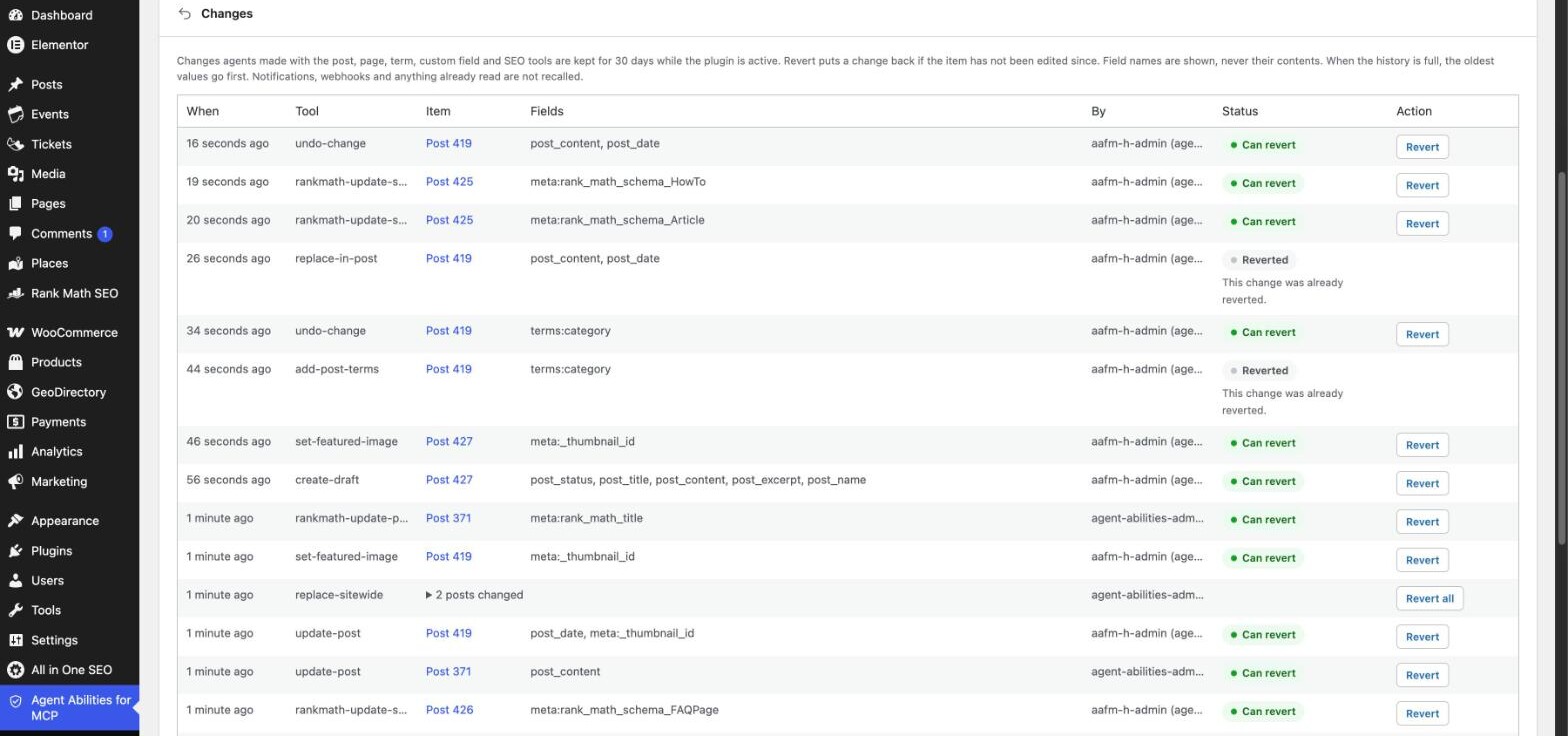
Every covered change gets a row in the Changes tab.
See what an agent changed and put it back from the Changes tab in the plugin’s wp-admin menu. Reverting from it needs an administrator account, not an agent, a tool or a connection.
A covered tool writes
The write goes through, and its response says whether the change can be undone, with a reason when it can’t.
The Changes tab records it
One row per change: the tool, the item, the field names it touched and the user it ran as. Field names are shown, never contents.
You put it back
Revert restores the earlier values if the item hasn’t been edited since. Revert all reverts a site-wide find and replace as one group. Post rows with revisions also link to WordPress’s Compare revisions screen.
The agent can undo its own work, and only its own.
Two optional tools, list-changes and undo-change, let an agent correct itself without you opening wp-admin. They are narrower than the Changes tab on purpose.
- list-changes readsIt lists the connection’s own recent changes to one post or term, with the field names and whether each can be undone now. Never a value.
- undo-change reverts one change per callOnly a change made on the agent’s own connection, from the last 24 hours, up to 30 undo calls an hour per connection.
- Both start offYou switch them on like any other tool. They are separate from the owner’s Revert button, which needs no tool at all.
- Left out of three presetsThe Read only, Content editor and Shop manager presets leave undo-change out, because it is a destructive tool. The Custom preset narrows nothing.
An illustrative exchange. The tool and argument names are real, and the refusal reason is the plugin’s own. The other wording and the ids are made up.
The 25 tools it covers.
Posts, pages and custom post types, creates, trashes, block edits, terms, custom fields, featured images and SEO fields. Each tool name links to its page.
Posts, pages and custom post types
Edits to the title, content, excerpt, status, slug, date, terms, featured image and custom fields, and on a page its parent and template.
Find and replace, and block edits
The post’s fields are recorded, so a replace can be reverted. A site-wide replace is recorded as one group.
Creates
Undoing a create moves the new item to the Trash.
Trashes
Undoing a trash takes the item back out of the Trash.
Terms
The terms on a post, and a term’s name, description and parent.
Custom fields
Post meta and term meta, for the keys the plugin lets an agent write.
Featured images
The image set on a post.
SEO fields
Each tool appears only while its SEO plugin is active.
Not on this list, not covered. Undo does not extend to any other tool of this plugin’s, and it does not reach tools that other plugins add through the Bridge.
What it can’t undo.
Every write tool says in its response whether its change can be undone, and why not when it can’t, so an agent is never left guessing.
- Permanent deletesThe item is gone from WordPress, so there is nothing to put back.
- Orders and refundsThey have effects outside the site content, so they can’t be undone.
- User accounts and site settingsAccount and settings data is not recorded.
- File uploadsA created file is not recorded.
- WooCommerce products, ACF field values, menus, comments and eventsThese tools do not record their changes.
- Avada and WPBakery Page Builder toolsNot recorded here. Element, template and Library edits return a revision for Restore revision when WordPress keeps one, and settings, layout, page code and page option changes return the earlier values to send back.
- Block-theme navigationNot recorded. When the site keeps revisions, an earlier version can be restored only if WordPress already kept it as a revision.
- Tools from other pluginsBridged tools are not recorded.
- Creating a termTerms have no Trash, so a new term can’t be put back.
- Notifications, webhooks and anything already readOnce sent or read, it cannot be recalled.
Inside the 25 tools, a revert can still be refused
- The item was edited after the agent’s change, or the revert would overwrite a newer edit.
- The change is older than 30 days, or the history was full and the oldest values were dropped first.
- The change was too large to keep, or a plugin filters the field, so it cannot be restored exactly.
- A page builder now owns the post, or the Trash is switched off.
- The key looks like a secret, so no copy of its value was kept.
What the history keeps, and how to turn it off.
Undo needs the earlier values, so it keeps them. The Changes tab does not show them, but they are in your database for as long as the history is kept.
What is stored
The change history keeps each change’s earlier values in its own table in your site’s database. The Changes tab shows field names only, never contents. The earlier values are never sent to us, and list-changes gives an agent field names, never a value.
Up to 30 days
Older changes are removed. A row or size cap can drop the oldest values sooner, so 30 days is the most you can count on.
Switch it off
It records only while the plugin is active, and the Keep change history switch under Settings turns it off. Earlier changes stay until they expire.
Removed on uninstall
The table is dropped on every uninstall and emptied by Reset. WordPress’s export and erase personal data tools cover it. A meta key that looks like a secret has no value stored.
Questions about undo.
Can I undo what an AI agent changed?
Yes, for edits made with 25 of this plugin’s tools: posts, pages and custom post types, creates, trashes, block edits, terms, custom fields (post and term meta), featured images and SEO fields. The Changes tab keeps up to 30 days and reverts a change if the item hasn’t been edited since, and it refuses a revert that would overwrite a newer edit. It lists field names, never contents, though the earlier values are stored in a table in your site’s database, and when the history is full the oldest values go first. No other tool of this plugin’s can be undone, including permanent deletes, orders, refunds, user accounts, file uploads, WooCommerce products, ACF field values, menus, comments and events, and each of them says so in its response. That includes the WPBakery and Avada tools, but a page edit keeps a WordPress revision when revisions are on, and most of the builder tools return it for restore-revision; their settings tools return the previous values instead, and an imported Avada Studio item is removed by deleting it in Avada’s Library. Tools from other plugins aren’t recorded either. Notifications, webhooks and anything already read are not recalled. Some plugins, GeoDirectory among them, turn revisions off for the whole site; a WP_POST_REVISIONS line in wp-config.php turns them back on. Two optional tools, list-changes and undo-change, let an agent undo its own changes from the last 24 hours, and both start off. History records only while the plugin is active, can be switched off in Settings and is removed on uninstall. WordPress’s export and erase personal data tools cover it.
ChatGPT or Claude edited the wrong post. How do I get it back?
Open the Changes tab in the plugin’s wp-admin menu, find the row for that post and press Revert. It puts the earlier values back if the post hasn’t been edited since, and it covers edits made with 25 of this plugin’s tools. It makes no difference which client made the edit. If the row says Cannot revert, it gives the reason, and a change older than 30 days may already be gone.
An AI agent deleted my post. Can I get it back?
It depends on how it was removed. If the agent trashed it, the post is in the WordPress Trash, and the Changes tab can take it back out of the Trash. If the agent permanently deleted it, this plugin can’t restore it: the delete tools skip the Trash, they are off by default, and the change history doesn’t record them. Restore it from your own backup, and use the Activity Log to see which tool ran.
How do I put a change back?
Open the Changes tab in the plugin’s wp-admin menu. Each row shows when it happened, the tool, the item, the field names it touched, the user it ran as and its status. Revert puts one change back. A site-wide find and replace shows as one group, and Revert all puts the whole group back. A post row that touched the content and has revisions also links to WordPress’s own Compare revisions screen. Clear history deletes the whole history, including the stored earlier values, so nothing in it can be reverted afterwards. A revert is refused if the item has been edited since, or if it would overwrite a newer edit.
Can the agent undo its own changes?
Yes, through two tools, list-changes and undo-change. Both start off. An agent that has them can undo only changes made on its own connection, from the last 24 hours, up to 30 undo calls an hour per connection. List-changes only reads. The Read only, Content editor and Shop manager presets leave undo-change out.
What can’t be undone?
Permanent deletes, orders, refunds, user accounts, file uploads, WooCommerce products, ACF field values, menus, comments and events, and every tool from another plugin. The Avada and WPBakery tools aren’t in the Changes tab, though most return a revision to restore or the earlier values to send back. Notifications, webhooks and anything already read are not recalled. Every write tool says in its response whether the change can be undone, with a reason when it can’t. Inside the 25 covered tools a change can still fail to restore exactly, for example when it is too large to keep, a plugin filters the field, a page builder now owns the post or the Trash is switched off.
What does the history store, and can I turn it off?
The Changes tab shows only field names, but the earlier values are kept in the change history, in its own table in your site’s database. It records only while the plugin is active, keeps up to 30 days (a row or size cap can drop the oldest sooner) and can be switched off with the Keep change history switch under Settings. The table is dropped on every uninstall and emptied by Reset, and WordPress’s export and erase personal data tools cover it. A meta key that looks like a secret has no value stored, and the aafm_undo_secret_key_patterns filter lets a developer add patterns.
Is there an approval step before an agent writes?
No. A write goes through as soon as its tool is on and the connected user may run it, and the Changes tab is how you put it back afterwards, within the limits above. Force draft on create saves what an agent creates or asks to publish as a draft, and read-only mode stops every write tool this plugin serves.
Let an agent work, with a way back for 25 of its tools.
Everything starts off, every call to the plugin’s tools is logged, and the 25 covered tools can be reverted from one tab.
Free on WordPress.org, with no paid tier.