New in 1.1.0

Bring in the abilities your other plugins register.

WordPress 6.9 added an Abilities API that any plugin can register against, not just this one. Agent Abilities for MCP can bridge those abilities and expose them as governed MCP tools, held to the same rules as its own. Every one is off until you turn it on.

Summary and contents

The short version

Bridging exposes the abilities your other active plugins register as governed MCP tools, beyond the fixed 153 catalog, off by default, and held to the same rules as every core ability.

In one line
Expose other plugins’ own abilities as governed MCP tools.
New in
Plugin 1.1.0.
How many
No fixed count. It depends on the plugins you run.
Default state
Off. You enable each one yourself.
Governed by
The same layer as core: scoped, gated, rate limited, logged.

One screen for everything your plugins expose.

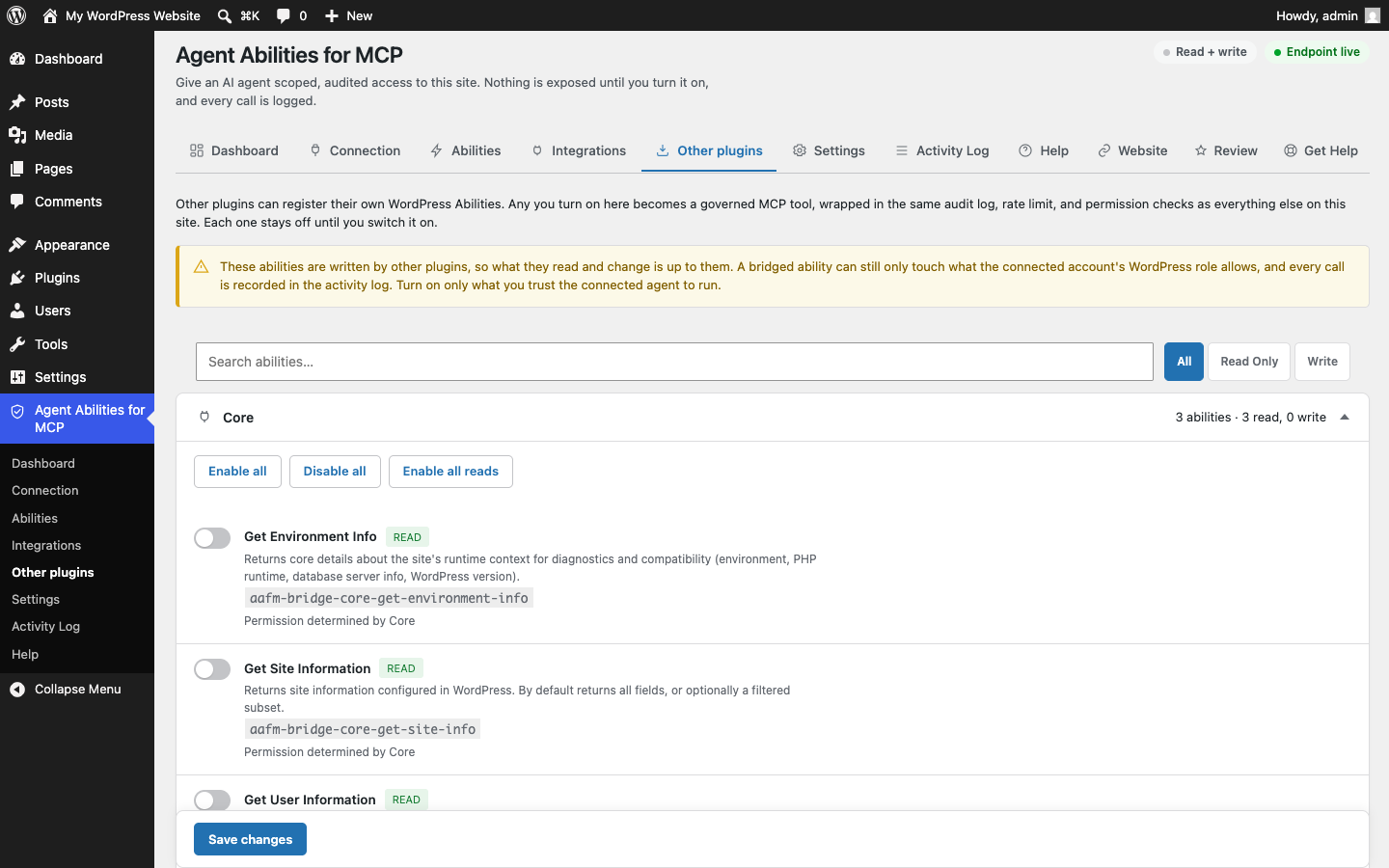
Bridged abilities land on a dedicated "Other plugins" tab, grouped by the plugin that registered them, each with an enable-all or disable-all switch for the whole set.

The "Other plugins" tab in wp-admin, listing the abilities WordPress Core registers, each one off, with a READ badge, its bridged tool name, and a note that Core decides the permission
Abilities your other plugins register, on their own "Other plugins" tab and grouped by the plugin that registered them. Here that is WordPress Core with three reads. A real screenshot of the plugin admin. Every bridged ability is off until you switch it on.

Beyond the fixed catalog

The plugin ships 153 governed abilities (83 core plus 70 integration), a fixed catalog. Bridging is separate from that count. It is a dynamic, site-specific set that depends on which of your other plugins register abilities, so it has no fixed number, and we never claim one.

How bridging works, in three steps.

WordPress 6.9 opened the Abilities API to every plugin. This plugin brings what they register into the same governance layer as its own abilities.

  1. A plugin registers its abilities

    WordPress 6.9 added the Abilities API, so any plugin can register abilities of its own, not only this one. Activate a plugin that does, and its abilities are available to bridge.

  2. You turn on the ones you want

    Bridged abilities appear on a dedicated screen, grouped by the plugin that registered them. Nothing is exposed until you enable it, one ability or a whole plugin’s set at a time.

  3. It runs under the same governance

    A bridged ability is treated exactly like a core one: scoped to the connected user, capability re-checked on every call, rate limited, and written to the same audit log.

New to the standard underneath this? Our WordPress Abilities API guide explains what an ability is, how a plugin registers one, and how the official MCP Adapter turns it into a tool an agent can call.

Bridged abilities are not the built-in integrations.

Two different things share a screen, so it is worth being precise. One set we build; the other your plugins register. Both are off until you turn them on.

We build these

First-party integrations

Integration code we write and maintain as part of the plugin.

What it is
Our own coverage for popular plugins such as WooCommerce and Advanced Custom Fields.
Who maintains it
Agent Abilities for MCP. It ships in the plugin and we keep it working.
How many
70 abilities across 5 integrations today, part of the fixed 153 catalog.
Default state
Off. Each one waits until you enable it.
Browse the integrations
Other plugins register these

Bridged abilities

Abilities your other active plugins declare, exposed through the same governance.

What it is
Abilities another active plugin registers through the WordPress Abilities API, surfaced here as MCP tools.
Who maintains it
The plugin that registers them. We govern how an agent reaches them; we do not write them.
How many
No fixed number. It depends entirely on which of your plugins register abilities.
Default state
Off. Each one waits until you enable it.
Read the Abilities API guide

Nothing is exposed until you choose it.

Bridging widens what you can turn on, never what is on. The default state does not change: everything stays off until you say otherwise.

Off by default, the same as everything else

Every bridged ability starts off. You turn each one on yourself, just like the core abilities, and you can enable or disable a whole plugin’s set in one click. Nothing another plugin registers reaches an agent until you choose it.

Governed exactly like a core ability.

Once you enable a bridged ability, it inherits the whole governance layer. Same checks, same limits, same log, no exceptions for code another plugin wrote.

Scoped to the connected user

A bridged ability can only touch what the WordPress account you bound the agent to is allowed to touch.

Capability re-checked on every call

The permission is verified before the ability runs, not trusted from discovery.

Rate limited

Bridged calls count against the same per-minute limit as the rest.

Written to the same audit log

Every call, denials included, lands in the log in your own database, with the argument keys but never the values.

What that looks like in practice.

Two plugins that register abilities of their own. When they are active and expose those abilities, you can bridge them here.

Example

Events Manager

If it is active and registers event, booking, and location abilities, those become available to bridge.

Example

WooCommerce, its own native abilities

Beyond our built-in WooCommerce integration, WooCommerce registers abilities of its own, and those can be bridged too.

To be clear: These are examples of what can be bridged when a plugin exposes its own abilities. They are not integrations we build or maintain. What actually appears depends on the plugins you run.

Frequently asked questions

Direct answers to the questions people ask about bridging other plugins’ abilities.

What is a bridged ability?

A bridged ability is one that another active plugin registers through the WordPress 6.9 Abilities API, which Agent Abilities then exposes as a governed MCP tool. It is not part of the built-in catalog. It comes from a plugin you already run, and it stays off until you switch it on.

How is bridging different from the built-in integrations?

The built-in integrations, such as WooCommerce and Advanced Custom Fields, are ones we build and maintain as part of the plugin, 70 abilities in all and counted in the fixed 153 catalog. Bridged abilities are registered by your other plugins, not by us, so the set is dynamic and specific to your site. We do not write or maintain them; we govern how an agent reaches them.

Are bridged abilities on by default?

No. Every bridged ability starts off, the same as the core catalog. You enable each one yourself, and you can turn a whole plugin's set on or off in one click. Nothing another plugin registers reaches an agent until you choose it.

How many abilities can I bridge?

There is no fixed number. It depends entirely on which of your active plugins register abilities of their own. That is why we never quote a count for bridged abilities: the built-in catalog is a fixed 153, but bridging is a dynamic, site-specific set.

Are bridged abilities governed like core ones?

Yes. Once you enable a bridged ability, it inherits the whole governance layer: it is scoped to the connected user, the capability is re-checked before every call, it counts against the same rate limit, and every call lands in the same audit log, denials included.

Widen the toolset, keep the same control.

Bring in the abilities your other plugins register, turn on only what you trust, and let the same governance hold every call.

Off by default. Scoped to the connected user, gated on every call, logged.