There has always been an awkward gap between installing this plugin and actually having an agent connected to your site. You install it, and then you read. You figure out whether to use OAuth or an Application Password, you hop between admin tabs to copy an endpoint and switch on the right things, and somewhere in there the momentum you had drains away. None of it is hard once you have done it. It is just more than it should be for the first few minutes.
Version 1.4.0 is about those first few minutes. It adds a Quick Connect wizard: a first-run screen on the plugin page that gets a new admin connected without the tab-hopping. The thing worth saying up front, because it is the whole point, is that it does this without loosening anything. Faster to start, still nothing exposed until you say so.
What was in the way
Two things made the cold start slower than it needed to be, and both are there for good reasons.
OAuth ships off. It has since 1.3.0, when a security pass turned it off by default so a fresh install could not be talked into approving a connection it never meant to. That is the right default, but it means the one thing most people need on to connect ChatGPT or Claude starts off, and you have to know to turn it on.
The settings are a full tabbed console. Dashboard, Connection, Abilities, Integrations, Settings, Activity Log. That breadth is the point once you are running, but on day one it asks a newcomer to visit three of those tabs in the right order just to make one connection. The wizard collapses that first path into a single screen without taking the console away.
One screen, two paths
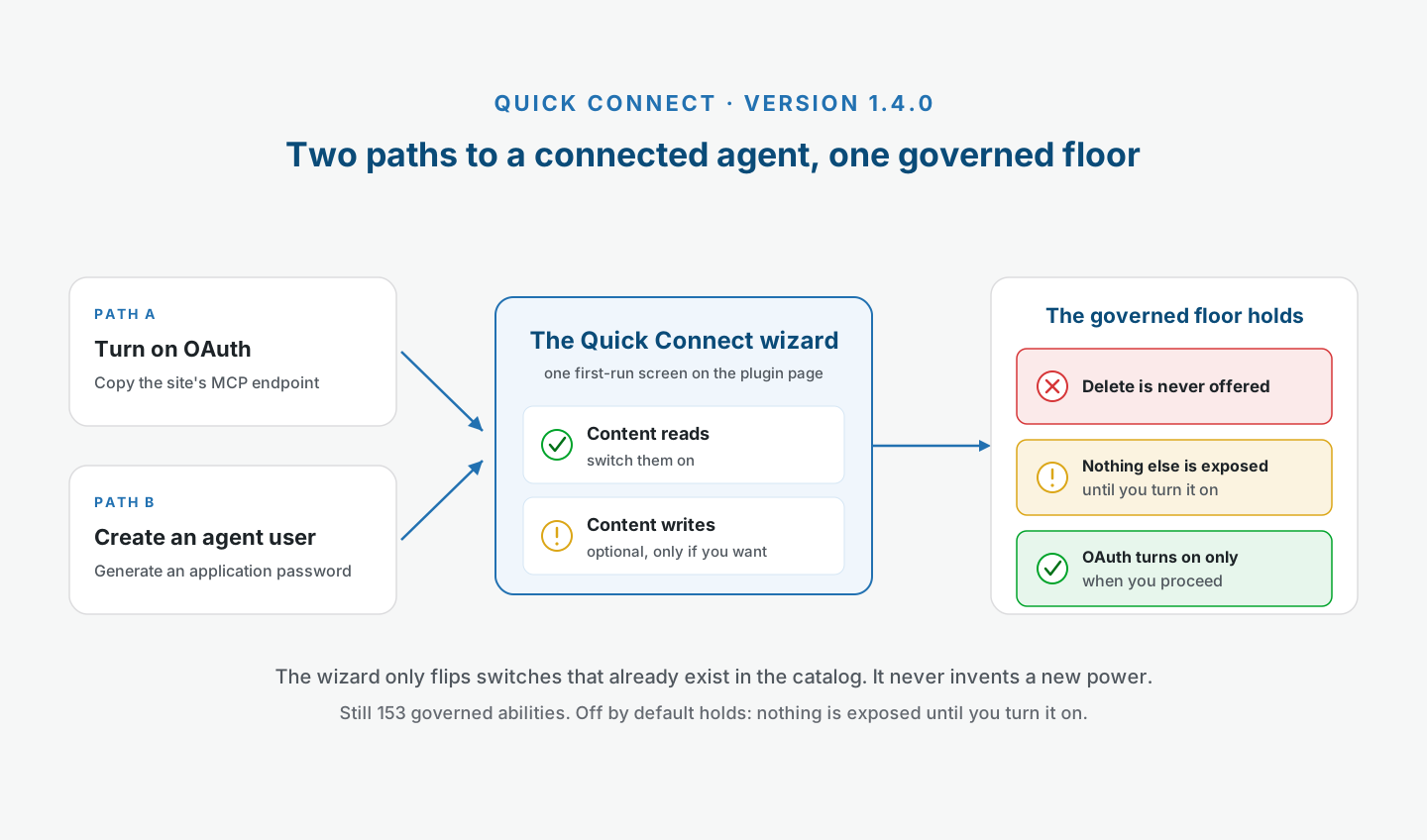
The wizard opens on the plugin page and puts the whole first connection in front of you at once. It offers the same two ways to connect the plugin has always had, so you pick the one that fits your client.
One path turns on OAuth and hands you the site’s MCP endpoint to copy. This is the route for the hosted apps, the ChatGPT and Claude and Manus side of things, where you paste the endpoint and approve the connection once in the browser.
The other path creates a dedicated agent user for you and generates an Application Password for it. This is the route for a client that connects from your own machine and wants a credential rather than a browser approval. It is the same dedicated, low-privilege account the plugin has always nudged you toward, made in one step instead of by hand.
Then, on the same screen, you switch on content reads, and if you want them, content writes. That is the connection made and the first abilities live, in one place, without leaving the page. If you want the difference between the two connection methods spelled out properly before you choose, OAuth or Application Password walks through both.
What it will not do
This is the part I care most about getting right, because a faster onboarding is worthless if it quietly widens what an agent can reach. It does not.
The wizard only ever flips switches that already exist. It toggles abilities from the catalog you already have, core plus content reads and writes, and nothing more. It does not invent a new power or unlock a bundle that was not there before.
It never enables a delete. Destructive abilities stay where they belong, off and out of the wizard entirely, so there is no path through this screen that ends with an agent able to remove things.
And it only turns OAuth on when you actively proceed. The screen may present OAuth as the ready path, but the option is not flipped on when the page loads. It changes when you move through the flow, deliberately, which keeps the 1.3.0 posture intact: on because you chose it, never on by accident.
Put together, the off by default model is untouched. The wizard is a faster way to make the choices, not a way to skip them. Everything the governance model describes still holds, because the wizard is just a friendlier front door to the same switches.
A pointer so you can find it
There is one more small piece. On a brand-new install, a pointer appears on the plugin’s admin-menu item and points you at the plugin page, so the place to start is easy to find rather than one more thing to hunt for. It greets a genuinely new install, and it shows once. Open the page or dismiss it and it does not come back.
A quieter fix worth naming
1.4.0 also corrects a signal that had been misreading. The onboarding “Connect your agent” step and the “Agent users” count used to treat any Application Password on the site as a connected agent. If your site had application passwords for something unrelated, an SEO tool, a backup service, anything, onboarding could show a false “done” and the count could sit higher than it should.
Now both track only the agent users this plugin created, or an approved OAuth connection. So an application password that has nothing to do with your agent no longer marks the step complete or pads the number. The count reflects agents you actually connected through the plugin, which is what it was always meant to say.
What you have when it finishes
None of this changes the catalog. It is still 153 governed abilities, 83 across WordPress core and 70 from auto-detected integrations, every one off until you enable it. The wizard did not add tools. It made the first ones easier to switch on.
What you have at the end is a freshly connected agent with a couple of reads live, which is exactly the moment the next question shows up: now what do I type. That is its own post. The first prompts to try after you connect an AI agent picks up right here, with the sentences I would actually run first on a site I had just wired up, starting read-only and building from there.
The goal was to make that first connection quick without making it any looser than it already was. The one screen is how 1.4.0 does both.