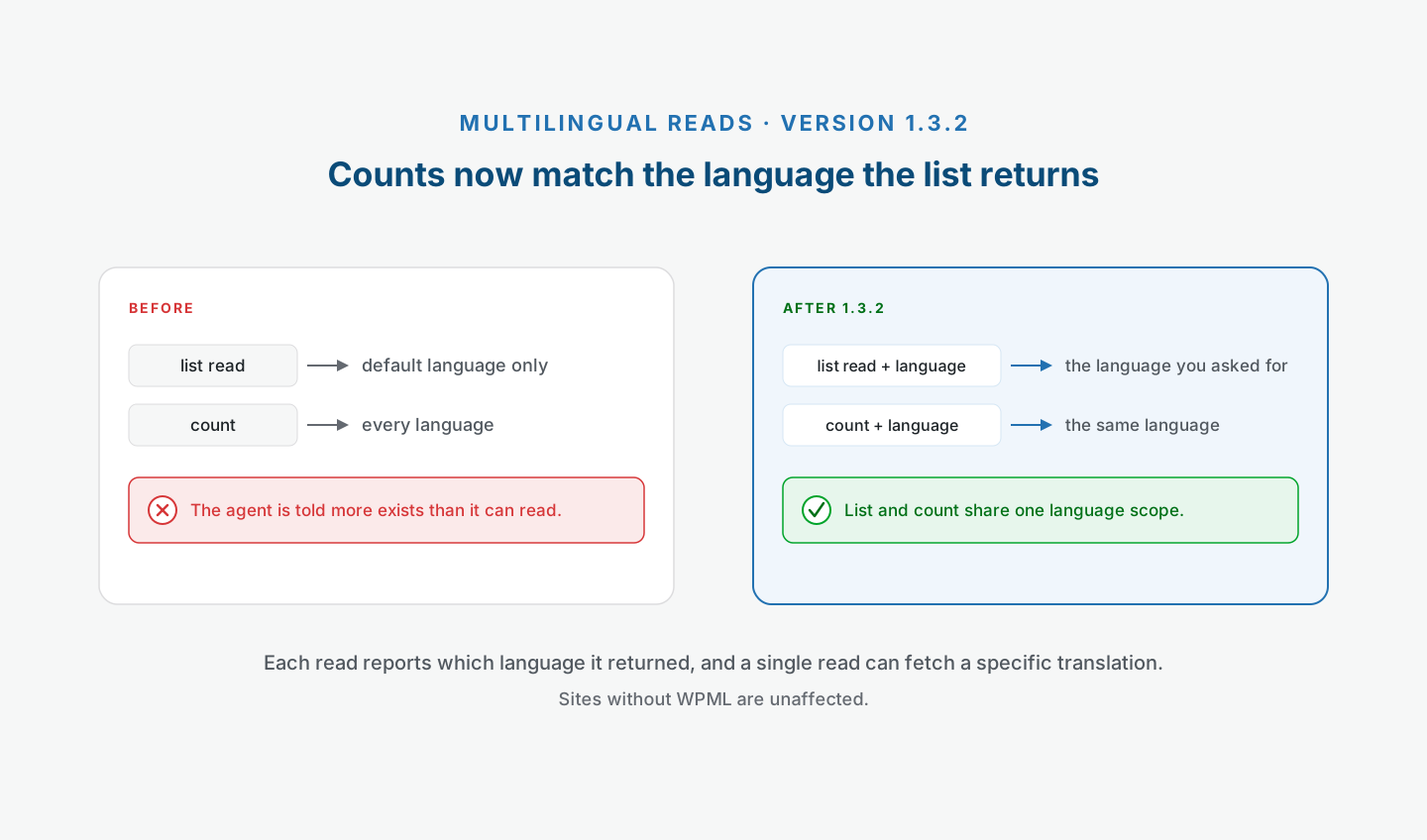
If you run WPML and connected a WPML AI agent to your site, you probably noticed the same thing everyone else did: your agent only ever saw the default language. It listed English posts, summarized English posts, and answered questions about your German or Arabic content as if it did not exist. Version 1.3.2 fixes that, not by adding anything to the catalog, but by teaching the reads you already have to speak about language.
Why a multilingual site confuses an AI agent
WPML sits between your queries and your content. It decides, per request, which language you are currently “in”, and it filters what comes back to match. That is exactly what you want on the front end. A visitor browsing the Spanish site should not get German posts mixed in.
An agent is not a visitor. It arrives over MCP with no browser session, no cookie, no URL prefix carrying a language code. So it lands in whatever WPML considers the default, and every read it makes inherits that filter silently. Nothing errors. The list just comes back short, and the agent has no way to know that it came back short. A multilingual WordPress AI agent that cannot name a language is guessing, and it does not know it is guessing.
Content reads now take a language, and tell you which one they returned
Posts, pages, search, terms, media, and products all accept an optional language argument now. So do the single-item reads. You can find them all in the content reads in the ability catalog.
Two details matter more than the argument itself.
The first is that it is optional. Existing calls keep working exactly as before, which is why nothing breaks for sites that never think about language.
The second is that every one of those reads now reports which language it actually returned. That is the part that makes the whole thing usable. An agent asking for Spanish posts gets Spanish posts and a statement that they are Spanish. An agent that asked for nothing in particular still learns which language it got. Without that, the model has to infer language from the text it received, and inference is where a translation workflow starts quietly going wrong.
Reading one specific translation of a post or product
Single-item reads take the same argument, so you can pull one particular translation of a post or a product directly.
This is what makes review work possible. “Fetch the French version of this product description and compare it against the English one” is now a single pair of reads with an unambiguous answer, rather than a hopeful query that returns the default language twice. The same applies to checking whether a translation exists at all, or spotting where one has drifted from the original after an edit.
The counting bug: when an agent is told more exists than it can read
This one was the most annoying to be on the receiving end of.
On a WPML site the content lists returned only the default language, but the counters counted every language. So a list would come back holding just the default language’s posts, while the total sitting beside it counted every translation too. The agent, quite reasonably, concluded there were more posts to fetch and went looking for them. It paged, it re-queried, and it reported gaps that were not gaps. A language filter causing a wrong post count sounds like a small arithmetic problem until you watch a model spend its context trying to reconcile it.
Counts now share the list’s language scope. If the list is scoped to one language, the count is too, and the agent stops digging.
Menu items that were created but reported as failures
The menu-item tools had a related failure, and a worse-feeling one. On a multilingual site, creating a menu item would report failure even though the item had in fact been created.
The cause was the same filter, applied one step later. The tool created the item, then read it back to confirm and return it. WPML’s language filter hid the item from that re-read, so the confirmation came back empty and the tool called it a failure. Anyone retrying got duplicates.
The menu-item tools now resolve the item by id, which is not subject to the language filter, so a created item is found and reported as created.
How we keep language-aware reads honest
Two things back this up on our side.
There is a contract test that runs against real WPML, tested against real vendor code, not mocks. Mocking a translation plugin’s filters proves nothing, because the filters are the behavior being tested.
There is also a build guard that fails if a read-only ability ever starts writing. Adding an argument to a read is a small change, and small changes to reads are exactly where a write can sneak in unnoticed. The guard means that cannot ship quietly.
Nothing changes if you do not run WPML
Sites without WPML are unaffected. The language argument stays optional, the counts were always correct on a single-language site, and the menu tools behaved. There is nothing to configure and nothing to turn on.
If you want to know which plugins the server detects automatically, the integrations page has the current list. WPML is not one of them in the sense that WooCommerce or ACF are, because 1.3.2 adds no abilities. The catalog is unchanged. What changed is that the reads already in it now understand language.
What this does not do
The plugin does not translate anything. It has no translation engine, it calls no translation service, and it makes no outbound requests of any kind. It contacts no AI provider. The agent connects in to your site, never the other way around. What you get back is what WPML already holds, reported accurately.
Being multilingual also does not earn the server looser permissions. Everything stays off by default, the agent is bound to one least-privilege user, capabilities are re-checked on every call, and every call is audited. Reading French posts requires the same grants as reading English ones. If you want the details of that, see the safety controls that bound what an agent can touch.
If you are on WPML, 1.3.2 is worth the update. Give it a read-only task first, something like asking for a list of posts in a non-default language, and check that the reported language matches what you asked for. That is a quick answer to whether your agent has been half-blind this whole time.