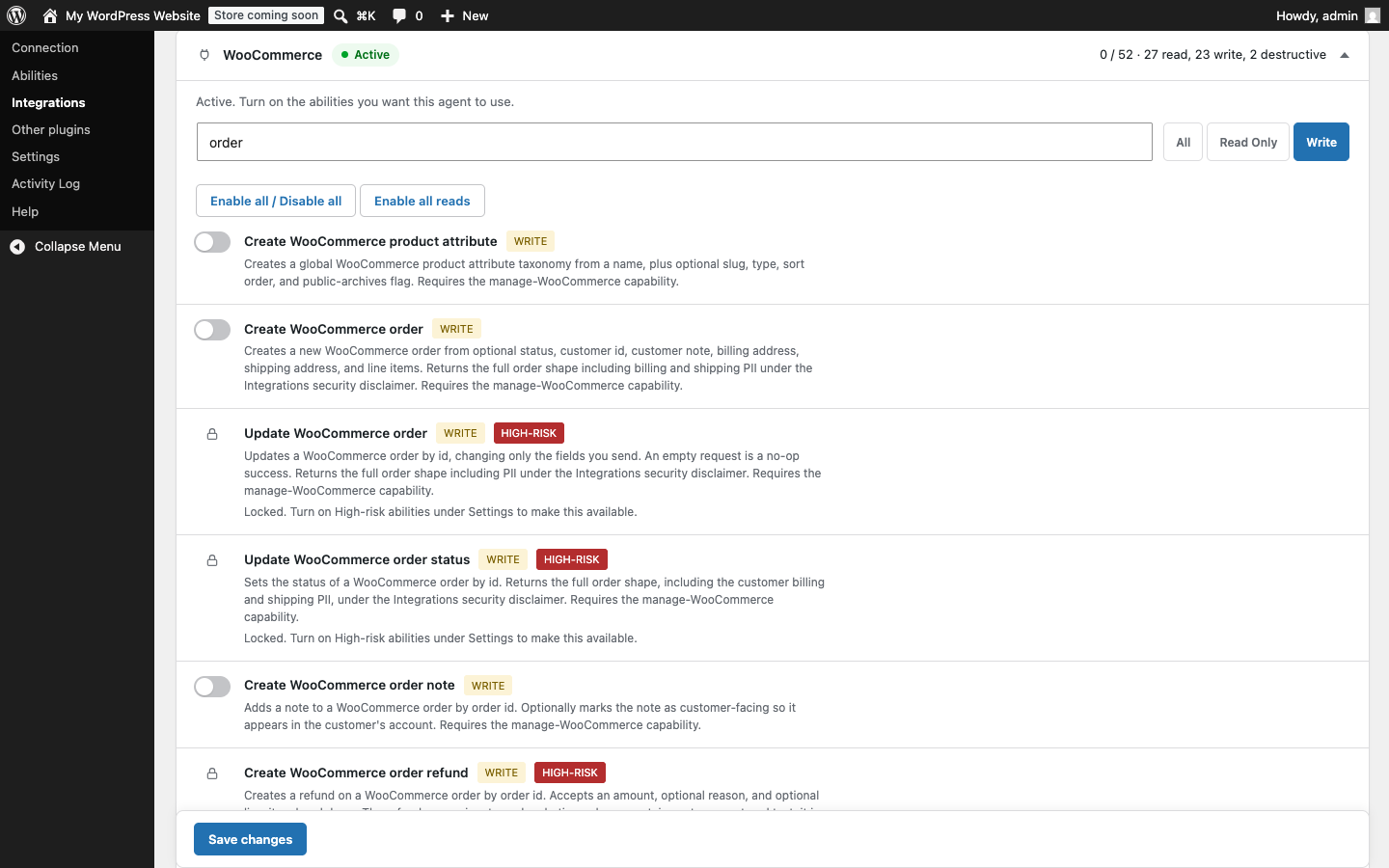
Most of what gets written about connecting an agent to WordPress is about permission. Can this account do this thing, and is that checked every time it tries. That is the right question, and the companion post on the off-by-default model walks through how it is answered: the agent connects as a real WordPress user, it only sees the tools that user is allowed to run, and every call re-checks the capability before it executes.
This post is about a question that runs earlier than any of that. Before an agent ever asks whether it may do something, there is the matter of whether the thing is on the list it can see at all. Capability gating decides what a connected user may do. Two other controls decide what is even on the menu. They are worth understanding on their own, because they behave differently from the per-call check and from each other, and because one of them is on by default while the other is off.
Two questions, not one
Think of it as the difference between the menu and the order. The per-call capability check is the order: the agent picks something and the plugin decides, at that moment, whether the bound user is allowed to have it. The two controls here work on the menu itself, which is the set of tools the agent is offered before it picks anything.
Keeping the two questions separate matters because they fail in different ways and you tune them for different reasons. You scope the account to control what a given agent may do. You use these two controls to decide what any agent, however it is scoped, is even shown.
The high-risk WooCommerce lock
The WooCommerce integration is the largest in the plugin, 52 abilities covering products, orders, and customers. Nine of those move money or grant authority, and they are treated differently from the other 43. They cover refunds, order status, order updates, customer updates, payment gateway settings, coupon creation and updates, and tax rate creation and updates.
The high-risk lock arrived in version 1.5.0, and 1.6.2 added editing a customer to the set it covers. Unlocking these takes two deliberate acts, not one. Switching the ability on is the first. It is not enough on its own. They stay locked until you also turn on a separate high-risk control in Settings. Only with both in place does one of these abilities become available to an agent. That second switch is itself written to the audit log, so the moment you widen the store’s exposure to an agent is a recorded event, not a quiet one.
This is the control that is on by default, in the sense that the lock is on: a fresh install has these abilities shut even if you go and enable them individually. It came out of a security review, after a reader pointed out that a single refund toggle could move real money the first time it was switched on. A refund is not a typo you fix in a draft. Putting a second, separate gate in front of the nine abilities that can spend, discount, re-authorize, or rewrite a customer’s account means no single click hands an agent the ability to touch money or personal data.
If your store never needs an agent issuing refunds or editing payment gateways, the honest advice is to leave the lock where it is. Enabling the other WooCommerce abilities does not touch it.
Read-only mode
Read-only mode, added in 1.6.0, works on the menu from the opposite direction. It is a single switch on the Settings tab, and it is off by default. When you turn it on, nothing that writes gets registered as an MCP tool, whatever you have ticked elsewhere.
The word registered is the important one. A blocked write here is not a call that gets refused when the agent tries it. It is a tool that is missing from the agent’s list entirely. The agent never sees it, never reasons about it, never spends an attempt on it. That is a stronger guarantee than a refusal, because there is nothing there to attempt.
Two details make it trustworthy rather than just convenient. First, it fails closed. An ability is kept only when it explicitly declares itself a read. Anything that declares neither read nor write counts as a write and stays out, so an ability the plugin cannot positively confirm is safe is treated as unsafe. Second, it reaches past the built-in catalog. Abilities bridged in from your other active plugins are covered too, each one judged by that plugin’s own annotation, so a write another plugin registered does not slip onto the menu because it lives outside this one.
The switch is written to the audit log, the same as the high-risk control. And it is purely a filter on what registers: turning it on enables nothing by itself, and turning it off enables nothing either, so your ability selections are exactly where you left them when you switch back. It is a floor you can raise and lower without disturbing anything underneath it.
Why the menu matters
A refusal and an absence both stop a dangerous call, so it is fair to ask why the distinction is worth this much attention. The answer is the surface. A tool that is present but refused is still something the agent can see, describe, and keep trying, and every attempt is one more thing to log and reason about. A tool that was never registered is not part of the conversation at all. When you want a hard guarantee rather than a reliable refusal, keeping something off the menu is the cleaner way to get it.
It also changes what you have to trust. To rely on a refusal, you trust that the capability check is correct for that ability on every path. To rely on an absence, you trust that the ability never registered, which is a smaller and earlier thing to verify. Both controls here are built to give you that earlier kind of certainty.
The through-line
In practice these two controls give you a simple way to think about a new connection. If the agent’s job is to read and summarize, turn on read-only mode and the question of writes is settled at the door, not at each call. If the agent works with your store, leave the high-risk lock on unless you have a specific, deliberate reason to let an agent move money, and if you do, know that flipping that second switch is a logged decision you can point to later. Neither control replaces scoping the account. They sit in front of it, deciding what the agent is shown before the account ever decides what it may do.